
Apply RGB Shift to images and videos online
Split RGB channels and shift colors for an iconic retro lens look. Create chromatic aberration effects on images and videos online.
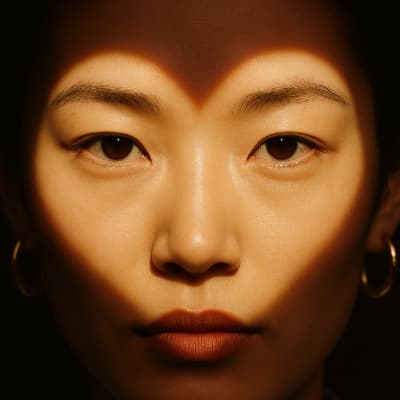 Before
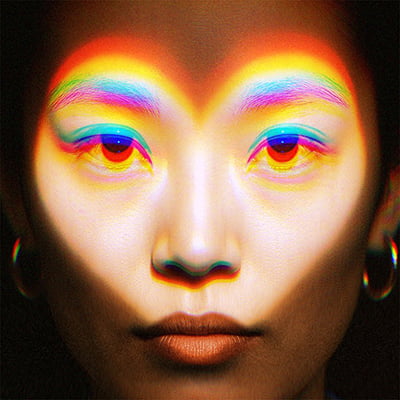 After
After
Ideas for using the effect
Retro aesthetics
Recreate analog lens flaws, VHS vibes, and old camera artifacts.
Glitch accents
Add subtle RGB separation to enhance glitch or distortion effects.
Motion emphasis
Use channel shifts to amplify movement and transitions in video.
Stylized photography
Give still images a bold, experimental color edge.
Made with this effect
More inspiration on Instagram @effect_app


Use RGB Shift in Photoshop, Figma or on your desktop
One account, the same effect everywhere.
In Photoshop
Apply it to a layer in Photoshop 2022 and later, on macOS or Windows. The plugin renders on your own GPU and hands the result back as pixels on a new layer.
get the Photoshop plugin →In Figma
Run it on images and frames without leaving the canvas. The Figma plugin is this same editor, pointed at whatever you have selected.
get the Figma plugin →On desktop
Install the macOS or Windows app when you want a window of its own, with your account and your presets already there.
download the desktop app →Frequently Asked Questions
What is RGB Shift?
RGB Shift separates red, green, and blue color channels and offsets them to create color fringing and distortion.
Is RGB Shift the same as chromatic aberration?
Yes. RGB Shift is commonly used to simulate chromatic aberration found in real camera lenses.
Can I control the strength of the effect?
Yes. You can adjust the amount and direction of channel shifts.
Does RGB Shift work on videos?
Absolutely. RGB Shift works in real time on both images and videos.
Can I combine RGB Shift with other effects?
Definitely. RGB Shift pairs especially well with Glitch, VHS, CRT Screen, and blur effects.
How do I do chromatic aberration in Photoshop?
The manual route is duplicating the layer three times and nudging each channel. The Photoshop plugin does the split in one control set on a layer in Photoshop 2024 and later.